5 best couple widget apps for iPhone in 2026
The best couple widget app depends on what you actually want to send: a photo, a drawing, a quick feeling or a little reminder that you’re thinking of each other. These five apps take noticeably different approaches.

In this guide
For varied widgets shared with one partner, consider Closer. For a shared pet routine, look at Widgetable. For photos with a close friend circle, start with Locket. For a simple drawing exchange, compare noteit and Loveit.
At a glance.
Choose by the kind of connection you want.
Swipe to compare all columns
| App | A good fit for | Check before choosing |
|---|---|---|
 Closer | Several ways to check in with one partner | Home Screen widgets are free with five partner-facing updates per person per UTC day. Pro adds unlimited updates, Lock Screen widgets and optional 30-day history. One active Pro purchase covers both linked partners. |
 Widgetable | A playful routine around shared pets | Check which widgets and pet features need a premium subscription. |
 Locket | Photos from a partner and close friends | Review your audience and the current Locket Gold features before setting it up. |
 noteit | A small visual note | Check the current in-app offers and the pairing experience on both phones. |
 Loveit | More expressive drawing and photo tools | The listing describes daily limits for free users and premium features; inspect the current purchase screen. |
The shortlist.
Start with the routine you want to share.
Closer
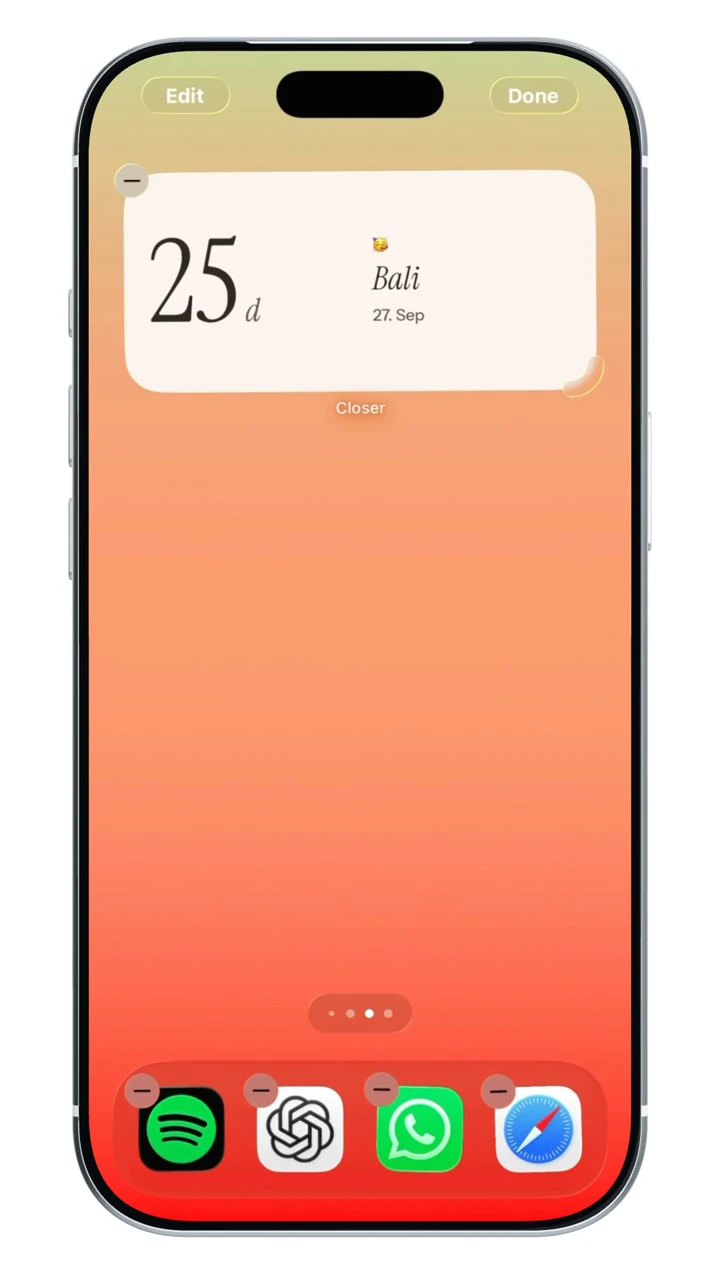
Several ways to check in with one partnerChoose Closer when you want moods, photos, drawn notes and shared dates in one place. A visit countdown and partner-time widget can make it useful beyond photo sharing, especially when you live in different places. It is designed around a linked pair rather than building a friend feed.
Before choosing: Both partners need iPhones. The free update allowance, Pro Lock Screen access and opt-in history are separate features.
View Closer on the App StoreWidgetable
A playful routine around shared petsConsider Widgetable if caring for a virtual pet together sounds like something you would both enjoy. Its broader collection also makes it worth exploring when you want social widgets and customization alongside that shared routine.
Before choosing: A pet-care habit is a different commitment from sending an occasional photo. Review the current premium options together.
View Widgetable on the App StoreLocket
Photos from a partner and close friendsLocket is worth considering when your main goal is opening your phone and seeing a fresh photo from someone close. Its friend-circle model can also be useful if the same app should include a partner, best friends and family.
Before choosing: Check who receives each photo. A shared friend circle and a dedicated partner widget serve different audiences.
View Locket on the App Storenoteit
A small visual notePut noteit on your shortlist when you mainly want to draw something or send a picture to a widget. That narrower purpose can make the choice easier if you do not need a countdown, shared pet or a larger relationship dashboard.
Before choosing: Try pairing and sending a note in both directions before committing to a paid option.
View noteit on the App StoreLoveit
More expressive drawing and photo toolsLoveit is an option to explore if you like customizing a note and sending playful actions as well as pictures. Compare the drawing workflow itself: the best tool is the one you will both feel like opening.
Before choosing: Its listing distinguishes free daily limits from subscribed access. Confirm those limits inside the current app.
View Loveit on the App StoreHow to choose a couple widget app
Start with one small ritual, not a feature checklist. If you only want to trade photos, a focused photo app may be enough. If you also need the next visit, their local time or an anniversary on screen, look for those specific widgets.
Ask your partner to choose a widget too. An app that one person loves and the other ignores will not make a useful shared habit.
- Check the exact widget size and whether it belongs on the Home Screen or Lock Screen.
- Send an update in both directions and confirm that the audience is right.
- Read the subscription screen together; a free download does not mean every widget is free.
What “live” widgets can and cannot promise
A widget is a glanceable surface managed by iOS. Marketing language about live sharing should not be read as a guarantee that every update appears immediately. Network conditions, the app’s synchronization and the system’s refresh decisions can all matter.
Choose on the sharing experience and the information you want to see, then use the developer’s support guide if updates are delayed.
Free widgets and unlimited sharing are different questions
A free download, access to a particular widget and the number of updates you can send are separate parts of an app’s offer. Choose the widget you want first, then check the purchase screen for that exact feature. A plan with more themes may not be the plan that increases sending limits.
For example, Closer includes its Home Screen widget types free, with five intentional partner-facing updates per person per UTC day. Pro changes the update allowance and adds Lock Screen formats. That matters differently to a couple who exchange one photo each evening and a couple who like sending notes throughout the day.
Decide what should remain after today
Seeing the latest photo on a widget is a different job from keeping a collection you can revisit. Before choosing, decide whether you want a passing check-in, one favorite memory on screen or a longer record of what you send.
In Closer, a selected Memory is separate from Pro’s optional history. That history covers future Moments and love-note drawings for 30 days after each sender opts in; it is not a permanent archive of every widget update. Compare the actual history rules when photos or drawings are the main reason you want an app.
A few more questions.
Which couple widget app is completely free?
Check the feature you want, not just the download price. The apps listed here are free to download from the reviewed US listings, but in-app purchases or limits can apply. Closer includes its Home Screen widget types free, with a daily update allowance.
Can couples use Locket instead of a dedicated couple app?
Yes, if photo sharing is the experience you want. Locket’s listing includes widgets dedicated to a specific person. If you also need shared countdowns, partner time or several other widget types, compare those needs separately.
Can a couple use these widgets with one iPhone and one Android phone?
This comparison evaluates official iPhone listings. Closer requires iPhones running iOS 17 or later. For another app, check its official Android listing and whether the two platforms can pair with each other before buying; a listing on both stores does not by itself prove identical widgets or features.
Sources & app credits.
Official resources checked for this guide. App names and icons belong to their respective owners; their inclusion does not imply endorsement of Closer.